






Remote Access
Access your remote desktop from any device, anywhere.
 Emily Stewart • Dec 22, 2025
With its open-source nature, cross-platform compatibility, and privacy benefits of self-hosted servers, RustDesk has become the top choice for many individuals and small teams as a remote desktop tool. However, most users who have tried it complain about its major drawbacks: connections take 5–10 seconds to establish, real-time screen clarity is mediocre, and there’s a 1–2 second operation delay—whether it’s keyboard and mouse commands or interface synchronization, it’s always half a beat slower than local operations on the controlled device, making it hard to meet the needs of efficient remote work.
If you’re also troubled by these issues and in urgent need of a smoother rustdesk alternative, this guide is just what you need. Below, we’ll round up 5 high-quality alternatives to RustDesk in 2026 to help you achieve stable, low-latency remote sessions.
Compatibility: Windows, macOS, Android, iOS, Web
Avica is one of the strongest RustDesk alternatives. This remote access tool delivers much lower latency, smoother cross-device control, and even includes gaming-oriented features. With screen latency kept around 0.2 seconds, it performs far better than RustDesk’s 1–2 second delay, offering a noticeably smoother remote experience suitable for both work and entertainment.
Experience
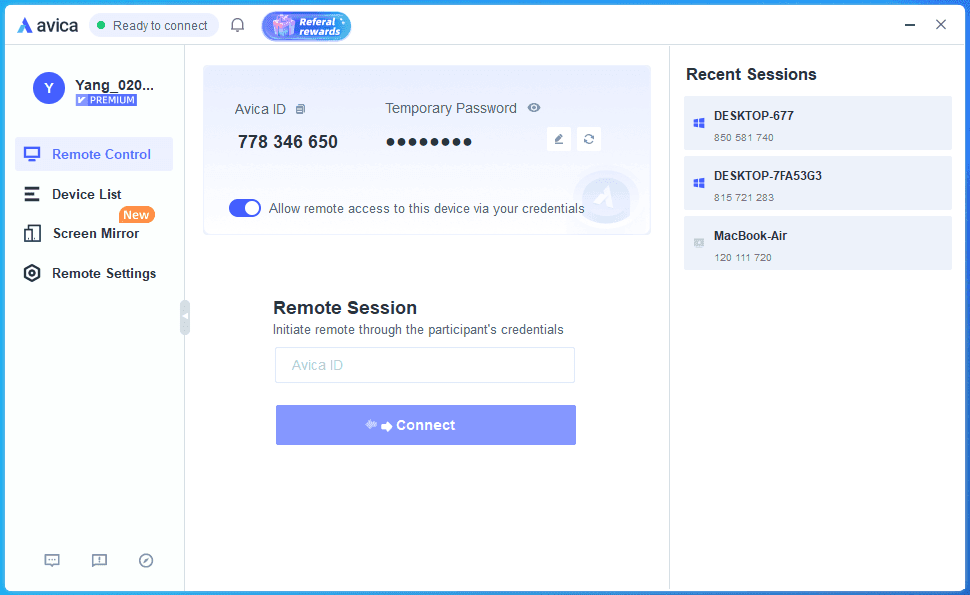
Avica is easy to get started with. Standard account registration is supported, and once the controller logs in and the controlled device installs the program, remote assistance can begin immediately. Mobile phones can serve directly as controllers, and you can even use remote control through a browser without installing a client—very convenient for quick, temporary access.
Devices under the same account connect without needing repeated password input, and connection records are automatically saved for reuse. Cross-device file transfer (such as sending photos between computer and phone) is simple and does not require repeated verification, making it smoother than RustDesk. One drawback is that the controlled device is not muted by default during remote sessions; privacy mode must be turned on manually.
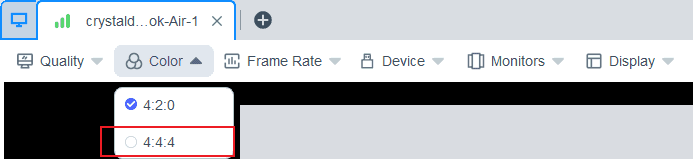
Avica also offers a range of practical visual controls: adjustable image clarity, frame rates up to 144FPS, and support for 4:2:0/4:4:4 color modes, making this remote access software suitable for both office tasks and entertainment. Advanced desktop features like multi-monitor access, multi-screen preview, and unattended access give users more flexibility and freedom.
File transfer is fast with no size or format limitations, and clipboard syncing plus drag-and-drop support make the process highly efficient. Power controls such as Wake-on-LAN, remote shutdown, and restart further simplify managing remote devices.
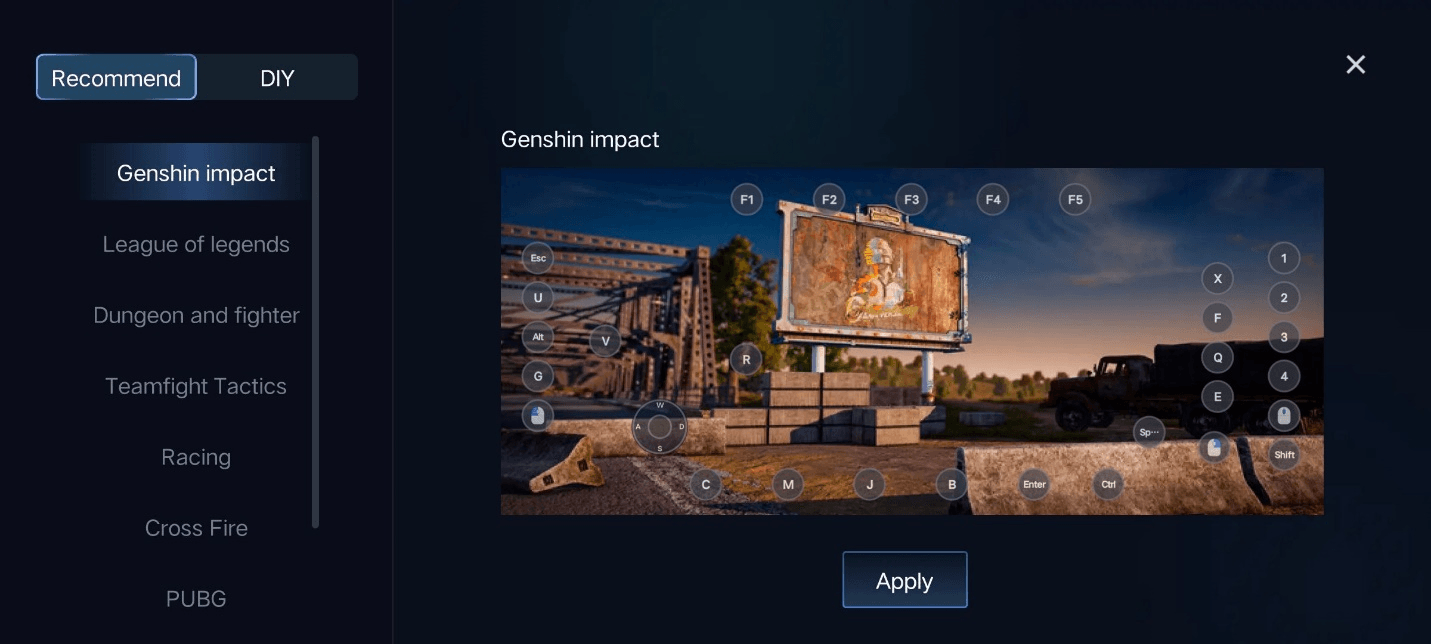
For gaming, Avica supports custom game keyboard mapping, 3D mouse control, and up to four game controllers simultaneously. For work scenarios, tools like screen recording, voice sync, and graphics tablet support help improve productivity and collaboration.
Permissions and Security
Avica’s permission system is based on account binding. Devices under the same account do not require additional verification, making it more convenient than RustDesk’s Remote ID and verification code method. It includes a privacy mute mode, but lacks more advanced security layers. Overall, its security level is roughly equivalent to RustDesk’s basic protection.
Pricing
Avica provides both free and paid plans. The free version includes essential features such as browser-based control and cross-device file transfer. Paid plans start at just $9/month, with a $15/month Premium option that unlocks advanced features like multi-device screen monitoring, gamepad support, and high-quality image capture on supported models. You can also activate memberships using redemption codes. Compared with RustDesk’s completely free open-source model, Avica offers more flexible options for users who need higher-level features.
Pros
• Very low latency (0.2s), significantly smoother than RustDesk
• Browser-based control and saved connection records make operation easier
• Strong gamepad and gaming feature support in the paid version
Cons
• No phone-to-phone remote control; iPhone casting has no control permission and offers low resolution
• HDR images may need improvement
Extended Reading: Top 11 Remote Management Tools 2026 for Modern Teams and IT Management
Compatibility: Windows, macOS, Android, iOS, web, ChromeOS, Linux
As a highly well-known veteran remote control tool, TeamViewer is a common alternative to RustDesk with complete basic remote control functions. However, it has issues such as high registration and usage thresholds, insufficient connection stability, and requires payment to unlock advanced capabilities. Overall, this RustDesk alternative is more suitable for users with certain experience.
Experience
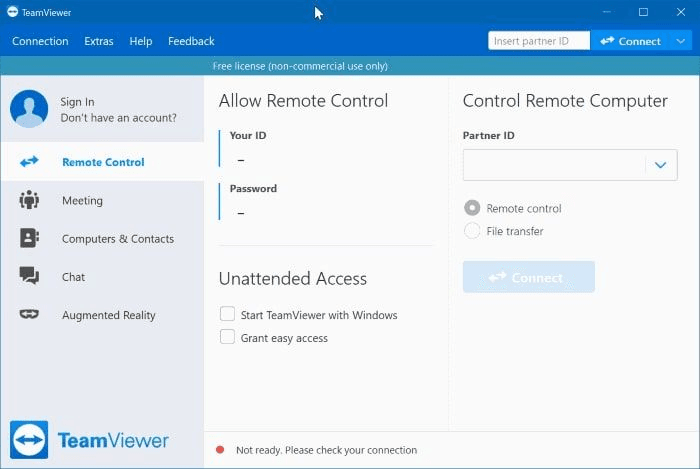
TeamViewer has a noticeable registration threshold, requiring multiple verification steps via email. Its connection process involves the controller entering the ID and password automatically generated by the controlled device. Although the logic is clear, the process is cumbersome.
Using a device-specific partner ID and password, users can establish connections through firewalls and NAT proxies, enabling near-local control of remote computers, servers, and even industrial equipment. It also supports scenarios such as temporary remote support and 24/7 unattended management, and allows remote wake-up to ensure business continuity. Additionally, it supports online meetings with up to 25 participants, meeting team collaboration needs. Two-way file transfer between mobile phones and computers is impressively fast—for example, a 300MB video can be transferred in 2 minutes—and voice communication can further enhance collaboration efficiency.
However, there are notable drawbacks: each transfer requires re-entering the controlled device’s ID and password, making the process redundant, and there are no transfer logs for traceability, so the convenience is far inferior to RustDesk.
Permissions and Security
TeamViewer has few permission division dimensions, making it difficult for the controlled device to finely manage the controller’s operation scope. Permissions such as "screen sharing only" need to be actively set by the controller, leaving the controlled device with no initiative. Security protection relies solely on ID and password verification, with no advanced protection mechanisms, and limited ability to intercept unauthorized access. Overall security is on par with RustDesk’s basic protection.
Pricing:
The free version is only for non-commercial use. If you want to use TeamViewer for work or unlock advanced features, you need a paid plan. Pricing starts at about $25/month per user (billed annually) and can go above $230/month for Corporate plans. Paid plans offer more device connections, better permission control, and more stable service. Overall, TeamViewer costs much more than RustDesk’s free open-source model.
Pros:
· High brand awareness with complete basic remote control functions
· Fast file transfer speed and good multi-platform compatibility
· Supports core power management operations
Cons:
· High thresholds for registration and privacy screen functions
· Free version has poor connection stability and non-commercial restrictions
· Poor audio synchronization and keyboard/mouse control experience
· Crude permission management with no initiative for the controlled device
Compatibility: Windows, macOS, Linux, Android, iOS, Raspberry Pi, ChromeOS
AnyDesk is a fully-featured alternative to RustDesk. It not only supports multi-platform adaptation and refined permission management but also comes with practical collaboration functions such as remote doodling, with connection stability and fluency far exceeding RustDesk.
Experience
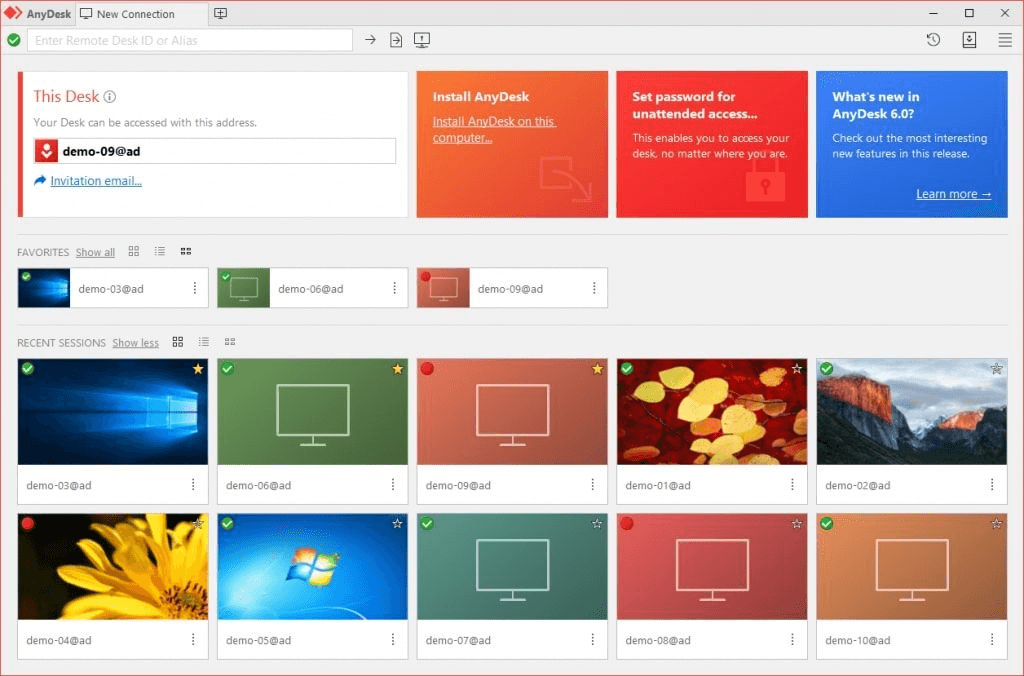
No complicated registration is required; AnyDesk remote desktop tool can be directly launched after downloading from the official website and automatically generates a local address code. The controller can remotely control the device by entering the address code and obtaining confirmation from the controlled device. The connection experience is excellent with fast speed and strong stability; real-time screen viewing has almost no latency, though clarity is mediocre. Keyboard and mouse commands are accurate, with only occasional cursor insensitivity, and it can run smoothly under high-load scenarios, far superior to RustDesk’s 1-2 second delay.
The toolbar has clear function entrances and distinguishes between free and paid permissions, covering comprehensive core capabilities: it supports custom screen ratios, multi-keyboard modes, and complete power management operations, and can control multiple desktops simultaneously for parallel sessions; two-way file transfer is fast with uninterrupted batch transfers and stable clipboard synchronization efficiency; built-in remote doodling function can be synchronized to the controlled device, suitable for visual communication scenarios such as remote teaching and technical support; provides multiple remote control modes including default, screen sharing only, and unattended, with customizable permissions to adapt to different scenarios.
However, the free version has shortcomings: the screenshot function is unstable, screen recording is limited to the local device, and advanced functions such as privacy mode require payment to unlock.
Permissions and Security
The controlled device can finely set permissions for keyboard and mouse control, file transfer, clipboard synchronization, etc., with comprehensive management dimensions. It supports remote control without login, and connections require manual approval from the controlled device, effectively intercepting unauthorized access. It also retains message and file transfer logs, with privacy and security far exceeding RustDesk.
Pricing
AnyDesk is divided into a free personal version and paid packages. Paid versions are classified by scale: Single user costs $23.12 per month, Teams version starts at $39.92 per month, and Ultimate version requires a custom quote. The paid threshold for advanced functions is higher than RustDesk.
Pros:
· Wide multi-platform adaptation with stable and smooth connections
· Supports multi-mode permissions and remote doodling, with rich practical scenarios
· Efficient file transfer and parallel remote control of multiple desktops
· Refined permission management and strong security
Cons:
· Mediocre remote screen clarity
· Free personal version has limited functions, screenshots are prone to failure, and core advanced functions require payment
Compatibility: Windows, macOS, Android, iOS
AnyViewer is a multi-device compatible alternative to RustDesk. The free version can achieve high-bitrate computer remote control and has built-in new user guidance for user-friendly onboarding. However, cross-platform connection stability is insufficient, with obvious flaws in multi-scenario adaptation, resulting in a highly polarized overall experience.
Experience
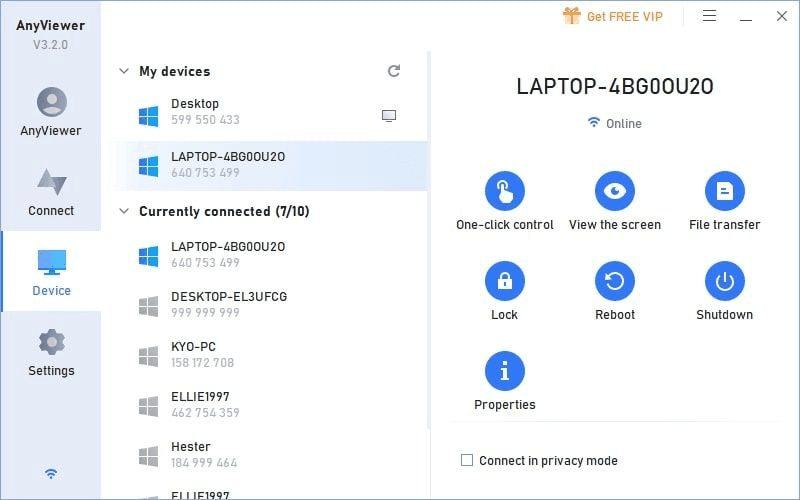
AnyViewer supports two connection modes: computer-to-computer control is possible without logging in, but file transfer is not allowed; after logging in, devices under the same account can be viewed or connected via codes, with a clearer operation path than RustDesk.
Actual tests show a latency of 0.1-0.6 seconds; the image quality and latency performance of computer-to-computer control are excellent, far exceeding RustDesk. However, cross-platform connections (especially mobile terminals) have extremely poor stability: some Android devices cannot connect, and the mobile-to-mobile control function is not available in actual tests, which is far inferior to RustDesk’s basic cross-device compatibility.
AnyViewer free version supports computer-to-computer and computer-to-mobile control with rich resolution presets. The mobile terminal has built-in tutorials with vibration feedback for touch operations, and same-network file transfer is fast, with computer remote control experience comparable to high-end paid tools.
Pricing
Free accounts can only stay logged in on up to three devices at the same time, and file transfer isn’t available unless you’re logged in. Features like multi-device simultaneous screen viewing and advanced cross-device adaptation are locked behind paid memberships. Subscriptions start at $47.88/year, with no monthly plan available.
Pros:
· Free version offers unlimited bitrate and low-latency computer remote control
· Multiple resolution presets and multi-language support
· Comprehensive mobile terminal tutorials with precise touch operations
· Efficient same-network file transfer
Cons:
· Poor cross-device connection stability with frequent connection failures
· Mobile controllers prone to accidental touches; computer terminals not adapted to high-resolution screens
· No file transfer between mobile phones and computers
· Free version only supports simultaneous login of 3 devices
Compatibility: Windows
UltraViewer is a RustDesk alternative focused on the Windows platform with a low learning curve and lightweight, stable operation, supporting simultaneous remote control of multiple devices. However, it has single compatibility and requires payment for advanced functions, making it only suitable for basic remote control scenarios of Windows users.
Experience
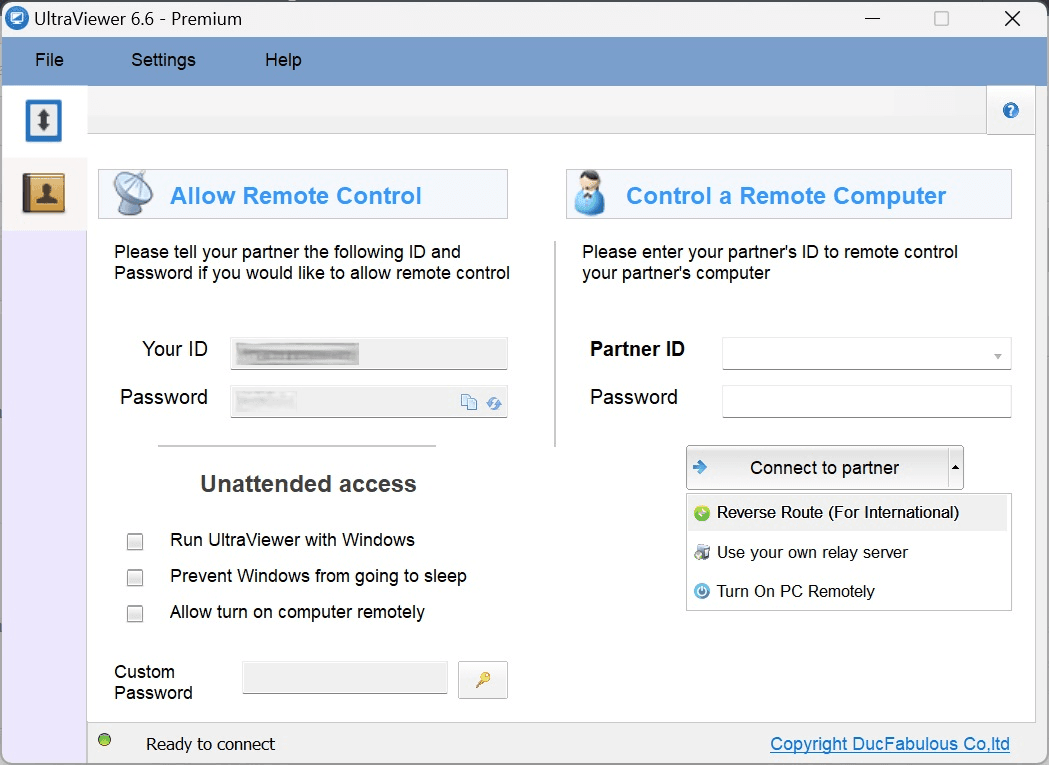
No account login is required; connection can be quickly established by entering the controlled device’s ID and password after installation, with a simpler process than RustDesk, fast connection speed, strong stability, and low system resource usage.
The remote control experience is balanced: screen clarity is good with only slight latency, keyboard and mouse control is precise, and it can run smoothly under high-load scenarios, with basic experience superior to RustDesk.
It integrates basic functions such as power management and real-time messaging, with the core advantage of supporting multi-user parallel sessions for simultaneous control of multiple computers. However, there are obvious limitations: the clipboard only supports text pasting with no file transfer capability; no advanced functions such as remote printing; advanced capabilities like screen recording require payment to unlock; and permissions such as "screen sharing only" can only be set by the controller, leaving the controlled device with no initiative.
File transfer must be done via the real-time chat window, with fast transfer speeds for both regular and large files, but no support for batch transfers or flexible two-way transfer, making the transfer method and efficiency far inferior to RustDesk.
Permissions and Security
Only supports Windows systems, with no availability on Linux, Mac, or mobile terminals, resulting in a narrower adaptation range than RustDesk. Security protection relies solely on ID and password with no mechanism to prevent unauthorized access, only retaining message logs, no privacy protection functions, and no initiative for the controlled device in permission management.
Pricing
UltraViewer’s free version supports basic remote control features, while advanced tools like screen recording require a paid plan (starting at $3.99/month). Compared with RustDesk’s fully free open-source model, it does have a noticeable paywall for certain features.
Pros:
· Low learning curve with support for simultaneous remote control of multiple devices
· Lightweight with low resource consumption and stable, smooth basic remote control
· Multi-language support with user-friendly interface
Cons:
· Only supports Windows systems with poor compatibility
· File transfer relies on chat windows with no batch sending capability
· No advanced functions such as remote printing; controlled device has no initiative in permission management with low security
Enterprise Security Supplement for Remote Access: AnySecura
Low-latency, cross-device remote access tools like Avica enable enterprises to set up efficient collaboration channels across devices. AnySecura, on the other hand, focuses on securing data during remote sessions, providing a robust safeguard for sensitive information. It is not a replacement for remote control tools such as RustDesk, but a dedicated security layer that works in tandem with them. Together, they achieve the dual goal of efficient remote access and end-to-end data protection.
AnySecura enhances endpoint protection and behavior auditing, complementing remote desktop tools with advanced security capabilities:
· Transparent document encryption: Prevents unauthorized copying, screenshotting, or printing of confidential files during remote operations.
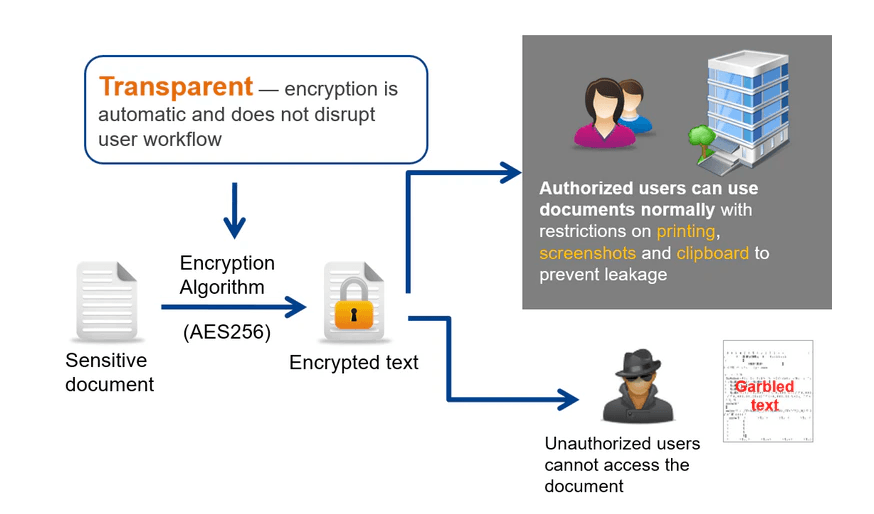
· Role-based access control: Restricts permissions for remote technicians, ensuring sensitive data remains protected.
· Real-time content monitoring: Detects potential data leaks during remote file transfers and triggers instant alerts.
· Multi-level approval & offline policies: Controls external document sharing and secures remote employees’ devices even offline.
By integrating AnySecura with tools like Avica, organizations can achieve smooth remote access without compromising enterprise-level security, filling gaps left by consumer-grade remote access software.
Finding a rustdesk alternative isn’t about picking the most powerful tool—it’s about the one that fits your scenario, devices, and budget. Here’s a simplified guide:
1. Define Your Main Use Case
· Hybrid work (office + games): Avica (0.2s latency, 144FPS, gamepad support)
· Team collaboration: TeamViewer (meetings) or AnyDesk (visual support)
· PC-only control: AnyViewer (free, high bitrate)
· Windows-only environment: UltraViewer (multi-device, lightweight)
· Specialized devices: AnyDesk (Linux, Raspberry Pi)
2. Check Device Compatibility
· Mixed systems: Avica, AnyDesk
· Apple ecosystem: Avica (iPad→Mac), AnyDesk (iPhone connection)
· Android + PC: Avica, AnyDesk; avoid AnyViewer
3. Budget Considerations
· Free: Avica Free, AnyDesk Free
· Low ($5–15/month): Avica Premium, UltraViewer
· Enterprise ($20+/month): AnyDesk Teams, TeamViewer Corporate
4. Test Core Performance
· Connection speed: <2s ideal
· Latency: <0.5s (Avica/AnyViewer excel)
· File transfer: Batch & large files (Avica fastest)
· Permissions: “Screen share only” test (AnyDesk most flexible)
Yes, RustDesk uses end-to-end encryption and is relatively secure. But its permission control is basic, and advanced privacy features are limited compared to commercial tools.
Avica is the RustDesk alternative that feels most like RustDesk but delivers a much smoother experience. It keeps the simplicity and cross-device support of RustDesk while offering significantly lower latency (~0.2s), faster file transfers, browser-based control, and extra features like gaming support—all without compromising usability.
Choosing the right remote desktop tool is crucial for productivity and smooth collaboration. While RustDesk is a popular choice for its open-source nature, its limitations in latency and functionality can be frustrating for many users.
For those looking for faster, more reliable, and feature-rich alternatives, Avica stands out as the best option. With its fast connections, low latency, cross-device support, and intuitive features, Avica is an excellent choice for both work and play. Whether you need smooth remote work or optimized gaming, Avica delivers a versatile, high-performance experience.




Connect Everything, Work Anywhere